
Do Batteries Stop Charging When Solar Gets Full? Here’s Exactly What Happens
Okay, imagine this. You’ve just installed a brand new solar system with a shiny battery bank. The sun is blazing outside. Your panels are producing power like crazy. And somewhere in the back of your mind, a question starts nagging at you:
“Wait — what actually happens when the battery fills up? Does it just… keep charging? Will it explode? Will it overcharge and die?”
These are completely legitimate questions — and honestly, most people never get a clear answer. They get vague reassurances like “don’t worry, the system handles it” without ever understanding how or why.
So let’s fix that today. By the time you finish reading this, you’ll understand exactly what’s happening inside your solar battery system from the moment the sun rises to the moment the battery says “I’m full” — and what the system does with all that extra solar energy after that point.
The Short Answer
Yes — a solar battery does stop charging when it reaches full capacity. But it doesn’t do this on its own through magic. It stops because of a dedicated piece of hardware called a charge controller (or a Battery Management System in lithium batteries) that monitors the battery’s state at all times and cuts or reduces the charging current the moment the battery reaches its maximum safe voltage.
Think of it like filling a water tank with a float valve — when the tank is full, the float rises and automatically shuts off the water supply. Your battery charging system works on the exact same principle, just with electrons instead of water.
The important thing to know is: this protection is built into every modern solar system by design. You don’t have to manually switch anything off. The system is engineered specifically to prevent overcharging from the first day you install it.
How Solar Battery Charging Actually Works
Let’s start from the very beginning, because understanding the full picture makes everything else click.
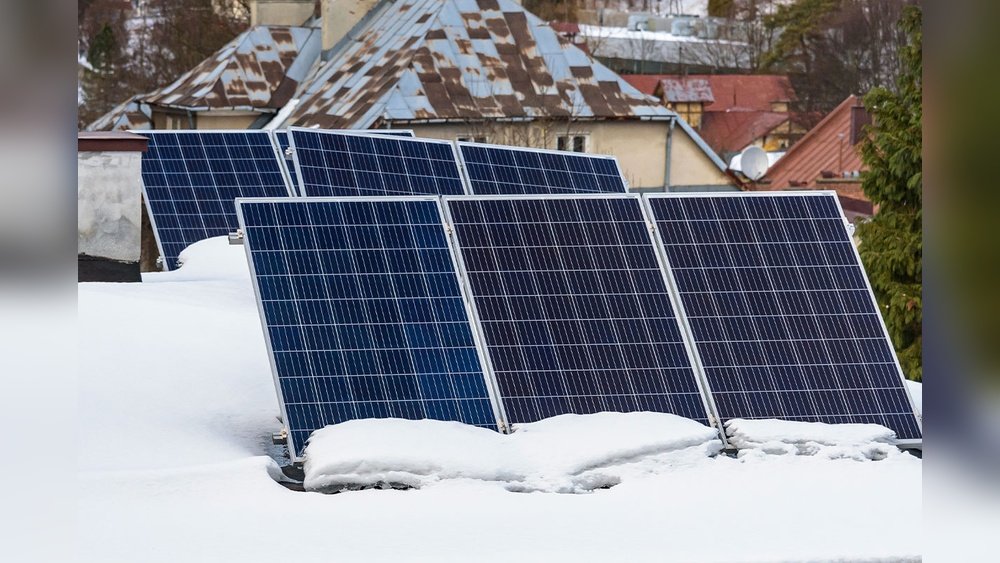
When sunlight hits your solar panels, the panels generate DC (direct current) electricity. That electricity flows through cables toward your battery bank. But here’s the thing — your panels can produce varying voltages depending on how bright the sun is, what angle the light hits, and the temperature of the panels. At peak midday sun, a panel might produce significantly more voltage than your battery is designed to receive.
If that raw, unregulated power from your panels flowed directly into your battery without any control — yes, you’d have a problem. Overcharging would be a very real risk.
That’s exactly why no properly designed solar system allows raw panel output to connect directly to a battery. There is always a control device in between — the charge controller — whose entire job is to manage the relationship between your panels and your battery, ensuring the battery receives exactly the right amount of power at every stage of the charging process.
What Is a Charge Controller and Why Does It Matter?
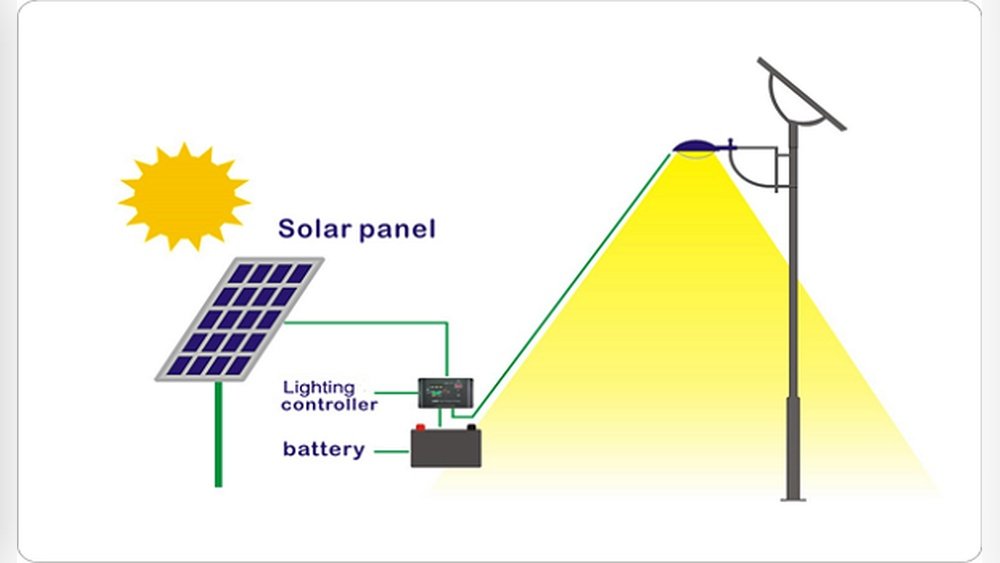
The charge controller is the unsung hero of your solar system. It sits between your solar panels and your battery bank and does several critical jobs simultaneously:
- Monitors battery voltage continuously — checking the state of charge at all times
- Regulates the charging current — ensuring the battery receives the appropriate amount of power at each stage of charging
- Cuts charging current when the battery reaches full charge
- Prevents reverse current flow at night (stops the battery from discharging back through the panels when there’s no sunlight)
- Protects against over-voltage — if panels produce more than the battery can safely accept, the controller clips the excess
There are two main types of charge controllers:
PWM (Pulse Width Modulation) controllers are the older, simpler technology. They regulate charging by rapidly switching the connection between panels and battery on and off — delivering power in very fast pulses. They’re affordable and reliable for smaller systems.
MPPT (Maximum Power Point Tracking) controllers are the modern standard and significantly more sophisticated. They continuously calculate the optimal voltage at which the panels produce maximum power, then convert that voltage to exactly what the battery needs. MPPT controllers extract 15–30% more energy from the same panels compared to PWM — making them the clear choice for any system where performance matters.
For the purpose of answering your question — both types stop charging when the battery is full. They just approach the charging process differently.
The Four Stages of Solar Battery Charging
Here’s something most people don’t realize: solar battery charging doesn’t just go from “empty” to “full” in a simple straight line. It happens in four distinct stages, each carefully managed by the charge controller to protect the battery and maximize its lifespan.
Understanding these stages helps you understand exactly when and how charging stops — and why it’s more nuanced than a simple on/off switch.
Stage 1 — Bulk Charging
This is the first and most exciting stage. Your battery is empty (or significantly depleted) and it’s hungry for power. The charge controller delivers the maximum available current from your panels directly into the battery. The battery voltage climbs steadily as it fills up.
During bulk charging, your solar system is working at its hardest. On a sunny morning with a depleted battery, this is when you see the highest energy flow rates. The battery is essentially demanding everything the panels can give it, and the charge controller is happily delivering.
Bulk charging continues until the battery reaches approximately 80% of its full capacity — at which point the chemistry inside the battery starts to become less receptive to rapid charging. Pushing the same high current beyond this point would stress the battery, generate excessive heat, and shorten its lifespan. So the charge controller automatically transitions to Stage 2.
Stage 2 — Absorption Charging
This is the careful, patient stage. The battery is around 80% full, and the charge controller holds the voltage at a fixed level — the absorption voltage, which is specific to your battery chemistry and type — and gradually reduces the current as the battery fills up.
Think of it like topping off a glass of water very carefully so it doesn’t overflow. You slow down as you approach the rim.
During absorption, the battery voltage stays constant and the current slowly drops — from high amps at the start of this stage to very low amps near the end. This stage typically takes 1–3 hours depending on the battery and the depth of discharge it’s recovering from.
When the charging current drops to a very low threshold — typically around 1–2% of the battery’s capacity — the charge controller recognizes that the battery is essentially full and moves to Stage 3.
Stage 3 — Float Charging (Maintenance Mode)
The battery is now full. The heavy lifting is done.
In float mode, the charge controller drops the voltage to a lower maintenance level — just enough to compensate for the battery’s natural self-discharge without pushing any significant new energy in. It’s like keeping a water tank topped up with just a trickle to replace the small amount that evaporates.
Float charging keeps the battery at 100% state of charge without overcharging it. Current flow during float is tiny — just milliamps in most cases — barely measurable. The battery isn’t really “charging” anymore; it’s simply being maintained.
This is the direct answer to the question: the battery doesn’t receive any meaningful charging current once it’s full. The charge controller takes care of this automatically.
Stage 4 — Equalization Charging (Lead-Acid Only)
For lead-acid batteries, some charge controllers periodically apply an intentional controlled overcharge — a higher-than-normal voltage for a short period. This is called equalization charging, and it’s not as alarming as it sounds.
Lead-acid battery cells can become slightly unbalanced over time — some cells holding slightly different charge levels than others. Equalization applies a brief higher voltage that brings all cells back to the same level, prevents sulfation (a degradation mode specific to lead-acid chemistry), and restores full capacity.
Equalization doesn’t apply to lithium batteries. Lithium cells are balanced by the Battery Management System (BMS) through a different process.
What Happens When the Battery Is Full?
So here’s the exact moment you asked about. The sun is still blazing. Your panels are still producing power. But your battery just hit 100%.
The charge controller drops to float mode — maintaining the battery at its full voltage with essentially zero current flow. The panels are still generating power, but the battery isn’t accepting any meaningful amount of it.
So where does all that solar power go?
This depends entirely on your system configuration:
In a grid-tied system with battery: Excess solar power that the battery can’t accept is automatically directed to your home’s appliances first. If your appliances are already powered and the battery is full, excess generation flows back into the utility grid through your inverter. Depending on your electricity provider, you earn a feed-in tariff payment for this exported energy.
In an off-grid system: The charge controller performs what’s called load diversion — routing excess power to a dump load (typically a water heater, space heater, or dedicated dump load resistor) to safely absorb the surplus without letting panel voltage rise dangerously high. This is a critical design element in off-grid systems — simply disconnecting the panels while they’re in full sun generates very high voltages that can damage components.
In a hybrid system with no grid and no dump load: MPPT charge controllers handle this by backing off their MPPT tracking — essentially operating the panels at a suboptimal voltage point that reduces their output to match the tiny float current the full battery needs. The panels are producing less than they could, but the system is stable and safe.
Overcharging — Is It a Real Risk?
In a properly designed and installed solar system — no, overcharging is not a realistic risk. The charge controller and Battery Management System are specifically engineered to prevent it.
However, overcharging becomes a risk in these situations:
Wrong charge controller settings. If someone programs incorrect absorption or float voltage settings for your battery type, the controller may push more voltage than the battery is designed for. This is why proper commissioning by a qualified installer matters.
Mismatched components. Using a charge controller rated for lead-acid with a lithium battery (without proper configuration) can lead to incorrect charging voltages that damage the lithium cells.
Failed or cheap charge controller. A low-quality charge controller without proper protection circuitry can fail to reduce current at the correct voltage threshold. This is why component quality matters — a $5 charge controller from an unknown brand is not equivalent to a quality MPPT controller from Victron, Epever, or Renogy.
Battery BMS failure. In lithium batteries, if the BMS fails, the cells lose their primary protection layer against overcharge. This is extremely rare in quality batteries but is the reason BMS quality matters in battery selection.
In all four scenarios, the common thread is poor quality or incorrect configuration — not a fundamental limitation of the technology. A properly specified, correctly installed, and quality-component system will never overcharge your battery.
What Happens to Excess Solar Power After the Battery Is Full?
This is the part that surprises most people who are new to solar.
Your panels keep producing electricity even when the battery is full. The sun doesn’t care about your battery’s state of charge — it just keeps shining. So what happens to that electricity?
The short answer is: it has to go somewhere. Electricity can’t just disappear, and panels under full sun generate significant voltage whether you want it or not.
Here’s exactly where it goes depending on your system type:
Grid-tied with battery (most common home setup): Your home appliances get powered first from live solar generation. Any surplus beyond what your home needs in real time exports to the grid. If your grid contract includes a feed-in tariff, you earn money or credits for this exported energy. In many countries this is an attractive proposition — you sell electricity you can’t use and earn back money toward your system payback.
Pure off-grid with dump load: A dump load is a secondary load that automatically activates when the battery is full and panels are still generating. Water heaters are the most common and practical dump load — you’re effectively converting surplus solar electricity into hot water storage rather than electrical storage. This is a smart, practical use of energy that would otherwise be wasted.
Hybrid inverter with MPPT: Modern hybrid inverters manage the whole situation intelligently. They power home loads first, charge the battery second, and manage any surplus through grid export or load diversion automatically — all without any input from you.
The point is: the system is always designed around the question “where does excess power go?” No well-designed solar installation leaves this unresolved. If your installer hasn’t discussed this with you, it’s a question worth asking.
Signs Your Battery Is Overcharging
Even though it shouldn’t happen in a properly designed system, it’s worth knowing the warning signs — just so you can catch a problem early before it becomes serious.
For lead-acid batteries:
- Excessive gassing — bubbling or hissing sounds from the battery more than occasional (some gassing during absorption is normal; continuous heavy gassing is not)
- Electrolyte loss — needing to top up distilled water much more frequently than expected
- Battery feels very hot to the touch — some warmth during charging is normal; hot is not
- Rotten egg smell — a sulfur smell near the battery indicates heavy overcharge-induced gassing
- Battery voltage reading higher than specified absorption voltage on your controller display
For lithium batteries:
- BMS protection tripping repeatedly — the battery disconnecting itself is the BMS doing its job, but repeated trips suggest a configuration problem
- Battery getting significantly warm during charging — lithium batteries should stay near ambient temperature; significant heat suggests excessive charging current
- Charge controller display showing voltage above the battery’s maximum spec
- Shorter than expected cycle life — gradual capacity loss faster than the rated degradation rate suggests the battery has been stressed
If you notice any of these signs, have your system checked by a qualified solar technician. These are fixable issues — but catching them early prevents permanent battery damage.
Battery Types and How They Handle Full Charge
Different battery chemistries handle the “full charge” moment somewhat differently — and understanding this helps you appreciate why proper charge controller settings for your specific battery type matter.
LFP (Lithium Iron Phosphate):
LFP batteries have a very flat voltage curve — meaning their voltage stays relatively constant across most of their state of charge range, then rises steeply near full. The BMS monitors individual cell voltages and cuts the charging circuit the moment any cell reaches its maximum voltage (typically 3.65V per cell). LFP batteries tolerate being kept at full charge very well — they can sit at 100% state of charge indefinitely without degradation, though many manufacturers recommend keeping them at 80–90% for maximum cycle life if long-term storage is planned.
Lead-Acid (Flooded):
Lead-acid batteries benefit from periodic float charging — holding them at full charge voltage keeps them from self-discharging and prevents sulfation. However, they should not be held at absorption voltage for extended periods. The transition from absorption to float is critical — a charge controller that stays in absorption too long damages lead-acid batteries over time.
Gel and AGM:
These sealed lead-acid variants are more sensitive to overcharge than flooded batteries because they can’t vent gases as easily. Charging voltages must be precisely matched to specifications — even slightly elevated voltage can damage the gel electrolyte or delaminate the AGM mat. Always use a charge controller with specific gel or AGM profiles.
NMC Lithium:
NMC cells are more sensitive to overcharge than LFP — they have a narrower safe voltage window and are more susceptible to damage from elevated voltage. The BMS protection is even more critical for NMC chemistry, and the charge controller cutoff voltages must be tightly specified.
How BMS Protects Your Battery
The Battery Management System (BMS) is the electronic brain inside every modern lithium battery — and it’s the last line of defense against overcharging, regardless of what the charge controller does.
Here’s what the BMS monitors and controls in real time:
Individual cell voltages: A lithium battery pack contains many individual cells wired in series. If any single cell reaches its maximum voltage — even while the overall pack voltage looks fine — the BMS immediately cuts the charging circuit. This is critical because cells in a pack can become slightly unbalanced over time, and protecting the weakest cell protects the entire pack.
Temperature: The BMS monitors battery temperature continuously. If the battery gets too hot during charging (above approximately 45–50°C for most LFP batteries), the BMS reduces or stops charging to prevent thermal stress. In very cold conditions (below 0°C), the BMS restricts charging rate to prevent lithium plating — a damaging phenomenon that occurs when lithium ions deposit as metallic lithium on the anode rather than intercalating properly.
Charge current limits: The BMS enforces maximum charge current limits. Even if the charge controller tries to push more current than the battery’s specification allows, the BMS limits what actually enters the cells.
Cell balancing: Over many charge cycles, individual cells drift slightly in capacity. The BMS actively balances cells — either by draining the higher cells slightly (passive balancing) or redistributing charge from full cells to less-full ones (active balancing) — keeping the pack performing uniformly.
The result of all this active management is simple: your battery is protected from overcharge by two independent layers — the charge controller and the BMS. Both would have to fail simultaneously for overcharging to cause damage. In quality components, this scenario is effectively impossible under normal operating conditions.
Common Myths About Solar Battery Charging
Let’s bust a few misconceptions you’ve probably heard floating around:
Myth 1: “You should disconnect the solar panels when the battery is full.”
False. The charge controller handles this automatically. Manually disconnecting panels while they’re in full sun creates dangerous high-voltage conditions and stresses your disconnect hardware. Leave the system to manage itself — that’s exactly what the charge controller is designed to do.
Myth 2: “A full battery means wasted solar energy.”
Not necessarily. In a grid-tied system, excess solar exports to the grid and earns you credits or income. In an off-grid system with a dump load, it heats your water. The energy isn’t wasted — it just goes somewhere other than the battery.
Myth 3: “Keeping the battery at 100% damages it.”
For most battery types, sitting at full charge doesn’t cause significant damage if the charge controller is in float mode (very low current maintenance). LFP batteries in particular are tolerant of being kept at full charge. Lead-acid batteries actually benefit from being kept topped up — deep discharge is far more damaging to them than full-charge storage.
Myth 4: “Cloudy days can’t charge the battery at all.”
False. Solar panels generate electricity from diffuse light, not just direct sunlight. On an overcast day, panels may produce 10–25% of their rated output — enough for meaningful battery charging, especially if the battery is only partially depleted.
Myth 5: “More panels = faster battery charging indefinitely.”
Not quite. Your charge controller has a maximum input current rating. Once you hit that limit, adding more panels doesn’t speed up charging — the controller simply operates the extra panels at a suboptimal point. Your battery also has a maximum C-rate (charge rate) it can safely accept. Exceeding it by massively oversizing the panel array can stress the battery even with a controller in place, unless the controller is specifically programmed with the battery’s maximum charge current limit.
Tips to Get the Most From Your Solar Battery
Now that you understand how the whole system works, here are some practical tips that make a real difference:
Match your charge controller settings to your battery. This sounds obvious but it’s frequently neglected — especially when installers use default settings. Lead-acid, AGM, gel, and LFP all have different optimal absorption, float, and equalization voltages. Wrong settings accelerate degradation significantly. Confirm with your battery manufacturer’s datasheet.
Don’t regularly discharge below 20% state of charge. The lower you discharge, the more stress each cycle puts on the battery chemistry. For LFP, staying above 20% DoD significantly extends cycle life. For lead-acid, staying above 50% is critical.
Keep your battery at a comfortable temperature. Most batteries operate best between 15–35°C. In hot climates, shade the battery enclosure from direct sun. In cold climates, insulate the enclosure to prevent temperature from dropping below 0°C during charging.
Use an MPPT charge controller, not PWM. The 15–30% extra energy harvested by MPPT means your battery charges faster on the same panels, reaches full charge earlier in the day, and gives you more usable energy. For any system above 200W, MPPT is the right choice.
Monitor your system regularly. Most modern charge controllers and inverters have app connectivity or display panels that show battery voltage, state of charge, charging current, and daily energy flow. Check these readings periodically — anomalies in charging behavior are often the first sign of a developing problem.
Size your panel array so the battery reaches full charge before 2 PM. If your battery is regularly still charging at 4–5 PM, your panel array is undersized relative to your battery capacity. Reaching full charge by early afternoon gives you maximum time in float mode and ensures the battery is fully topped up before sunset.
Frequently Asked Questions
Do batteries stop charging automatically when full?
Yes — completely automatically. The charge controller transitions from absorption mode to float mode when the battery reaches full voltage, reducing the charging current to near zero. A lithium battery’s BMS provides an additional independent protection layer by cutting the charge circuit if any cell exceeds its maximum voltage. No manual intervention is needed — modern solar systems are designed to manage this without any input from the user.
What happens to solar power when battery is full and no appliances are on?
In a grid-tied system, excess solar power exports to the utility grid automatically through your inverter. In an off-grid system, the energy flows to a dump load (like a water heater) or the charge controller backs off the panels’ operating point to reduce their output. The system manages this automatically — no panel damage occurs and no energy builds up dangerously.
Can a solar battery explode from overcharging?
In extremely poor quality batteries without BMS protection, severe overcharging can in theory cause dangerous outcomes including swelling, electrolyte venting, or in worst-case scenarios with certain lithium chemistries, thermal runaway. In practice, any quality battery with a functioning BMS and a properly configured charge controller will never reach this point. LFP batteries are particularly resistant to thermal runaway even under abuse conditions. The risk is associated with low-quality components, not with solar battery systems in general.
How do I know when my solar battery is fully charged?
Most solar charge controllers have a display or indicator light that shows the current charging stage — bulk, absorption, or float. When the controller shows “float,” your battery is full. If your system has app connectivity or a battery monitor, the state of charge (SoC) percentage gives you a direct reading. Many systems also show the current charging current — when current drops to near zero or a very small maintenance figure, the battery is full.
Is it bad to leave solar connected to a full battery?
No — this is normal operation. The charge controller in float mode provides a tiny maintenance current that compensates for the battery’s natural self-discharge, keeping it at 100% state of charge. This is not harmful. Lead-acid batteries actually benefit from continuous float charging. LFP batteries tolerate it well. The float mode exists precisely for this scenario — sun is shining, battery is full, system maintains the battery gently until power is needed again.
Why does my battery sometimes show above 100% charge?
Charge percentage readings can be imprecise, especially in lead-acid batteries whose voltage-to-capacity relationship is affected by temperature and recent charging history. A reading showing 101–103% typically indicates the battery monitor’s calibration needs updating — not that the battery is dangerously overcharged. If your charge controller is in float mode, the battery is being correctly maintained regardless of what the percentage display shows.
My battery reaches full charge quickly but discharges fast — what’s wrong?
This typically indicates one of three issues: the battery’s capacity has degraded (most likely if the battery is several years old), the battery was never as large as its rated capacity (common with budget batteries), or your system is consuming more power than you realize. Check the battery’s current cycle count against its rated cycle life, verify actual measured capacity with a proper load test, and audit your daily consumption against your expected system output.