
Have you ever stood in your backyard, staring at a solar panel, wondering if it’s really working—but you don’t own a multimeter? Maybe you just installed a new panel, or you’re troubleshooting an old one. You search online and everyone says, “Just grab a multimeter!” But what if you don’t have one?
Should you buy a tool you might only use once? You’re not alone—many people want to test their solar panels without fancy equipment. The good news? You can absolutely check if your solar panel works, and even get a rough idea of its health, using simple tricks and everyday items.
Let’s skip the complicated tech talk. If you want to know whether your solar panel is actually producing power, you don’t need to be an electrician. You just need a little common sense, some household items, and a willingness to observe closely.
Below, I’ll walk you through simple, practical ways to test your solar panel’s performance—no multimeter required.
Short Answer: Quick Ways To Test A Solar Panel Without A Multimeter
You can test a solar panel without a multimeter by using devices that need DC power, like a small fan, LED, or USB charger. Connect the device to the panel in direct sunlight—if it works as expected, the panel is producing power.
For more details, examples, and extra tips, keep reading!
Why People Test Solar Panels Without A Multimeter
Not everyone has a toolbox full of gadgets. Many people:
- Just want to know if their panel is working, not get exact numbers.
- Are in remote areas where tools are hard to find.
- Want a fast, DIY method before spending money or calling a pro.
Testing with simple items can give you enough confidence to know if your panel is alive or dead. It’s not as precise as using a multimeter, but it works for most basic needs.

Credit: www.youtube.com
Understanding Basic Solar Panel Output
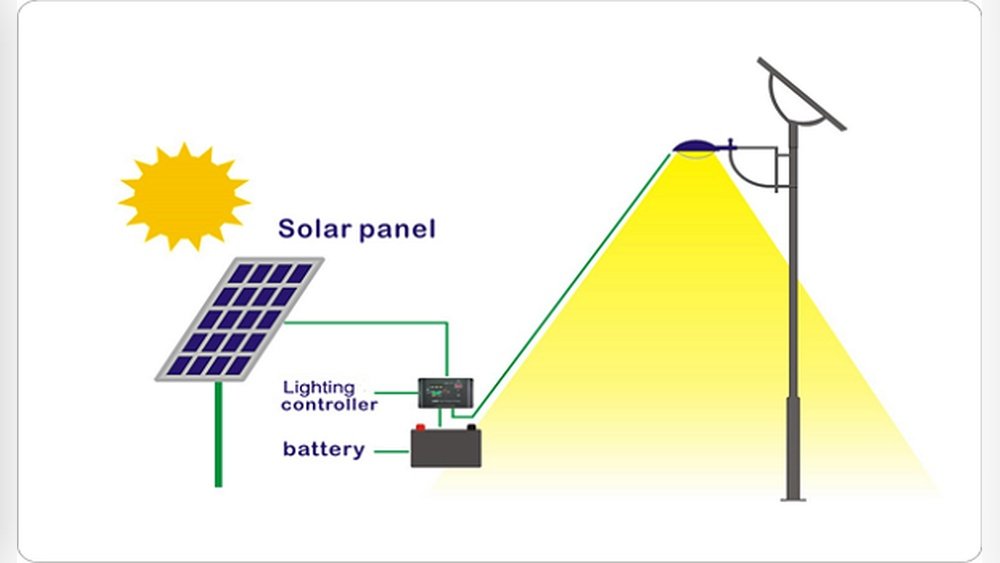
Solar panels convert sunlight into direct current (DC) electricity. A typical small panel (like for camping or garden lights) puts out 6V, 12V, or 18V. Larger home panels can produce 30V or more. The key things to check are:
- Is the panel producing any power?
- Can it run a small device?
- Does it still work in different lighting?
You won’t know the exact voltage or amperage, but you’ll see if the panel “does its job. ”
What You’ll Need (no Multimeter Required)
Here’s a list of common items that help you test a solar panel:
- Small DC device (LED bulb, USB fan, or USB phone charger)
- USB tester (optional, but useful if you have one)
- Wires with clips or old charging cables
- Screwdriver (to access panel terminals)
- Sunlight (the brighter, the better)
If you want to get creative, you can use other things like a small radio, garden light, or even a car charger.
Method 1: Testing With A Small Dc Device
This is the easiest way to check your panel. Most small devices that run on DC power (like LEDs or USB fans) can be connected directly. Here’s how you do it:
1. Pick A Device
Choose a small device that matches your panel’s output. For example, if you have a 12V panel, use a 12V LED or fan.
2. Connect To Panel
Attach wires to your panel’s positive (+) and negative (−) terminals. Connect these to the device’s matching wires (red to +, black to −). If you’re using an old USB cable, strip the ends to expose the wires.
3. Place Panel In Sunlight
Set the panel facing direct sunlight. Clouds or shade will reduce output a lot.
4. Check Device Function
Does the device turn on? If so, your panel is producing power. If not, try moving to stronger sunlight or double-check your connections.
Tip: If your device has a polarity (positive and negative sides), make sure you match them correctly. Some devices won’t work if connected backwards.
Example: Using A 12v Led Strip
Let’s say you have a 12V solar panel and a 12V LED strip. Connect the LED strip directly to the panel and set it in the sun. If the strip lights up bright and steady, your panel is working well.
If it flickers or doesn’t light, there may be an issue.
Method 2: Using A Usb Device (charger Or Fan)
Many modern solar panels have USB outputs. You can use a simple USB-powered gadget to test output.
- Plug a USB device (like a phone charger, fan, or light) into the panel’s USB port.
- Place the panel in sunlight.
- If the device powers up or your phone starts charging, the panel is working.
Note: Charging speed will be slow on cloudy days or if the panel is dirty.
Extra Insight: Using A Usb Tester
A USB tester is a cheap little gadget that plugs between the panel and your device. It shows voltage and current on a tiny screen. It’s not a multimeter, but it gives you more info than just “on or off.” These testers cost just a few dollars and can help spot weak panels.
Method 3: Testing With A Small Motor Or Fan
A small DC motor or fan acts as a “dynamic load”—it only runs if enough power is present.
- Connect the panel to a small motor or fan.
- Place in sunlight.
- If the fan spins, your panel is alive. If it spins slowly or not at all, the panel might be weak.
Why This Works: Motors are sensitive to voltage. A healthy panel spins the fan fast; a weak panel barely moves it.
Method 4: Using A Small Incandescent Bulb
Incandescent bulbs (not LEDs) are simple “load testers. ” They light up if the panel makes enough voltage.
- Match the bulb voltage to the panel (e.g., 12V bulb for 12V panel).
- Wire the bulb to the panel.
- Place in sunlight.
If the bulb glows bright, the panel is working well. A dim glow means weak output.
Caution: LEDs are picky about voltage; incandescents are more forgiving for rough tests.
Credit: electrozlab.com
Method 5: Testing Solar Garden Lights
Many solar garden lights have removable panels. You can swap panels between lights to see if one is “dead. ”
- Swap the panel from a working light to the suspect one.
- If the light turns on, the panel is fine.
- If not, the panel may be faulty.
This method is basic, but useful for small, plug-and-play solar products.
Method 6: Checking A Battery Charging Circuit
Some solar panels are used to charge batteries (like 12V lead-acid or lithium). You can test if the panel charges the battery using a few signs:
- Is the battery warmer after a few hours in sunlight?
- Does a connected device (like a radio or light) work after charging?
- Does a charging indicator (if present) light up?
Warning: Don’t leave batteries unattended. Overcharging can be dangerous.
Comparing Testing Methods
Here’s a quick look at how these methods compare in terms of simplicity, accuracy, and what they tell you:
| Method | Skill Needed | Accuracy | What You Learn |
|---|---|---|---|
| DC Device (LED/Fan) | Beginner | Basic | Panel is working or not |
| USB Device | Beginner | Basic | Panel can power USB device |
| Motor/Fan | Beginner | Basic | Panel’s “strength” (by speed) |
| Incandescent Bulb | Beginner | Basic | Panel output strength (by brightness) |
| Battery Charging | Intermediate | Rough | Panel can charge a battery |
Important Safety Tips
- Always connect devices that match your panel’s voltage.
- Never short-circuit (touch + and − wires together).
- Don’t test with high-power devices like car headlights or power tools.
- Be careful with exposed wires—use electrical tape to cover bare metal.
- Keep water away from connections.
Signs Your Panel Might Be Failing
Even if a panel powers a small device, it might not be 100% healthy. Look for these signs:
- Works only in very bright sun (not in light cloud).
- Output is weak or devices run slowly.
- Panel feels very hot but produces little power.
- Physical damage (cracks, yellowing, burned spots).
If you see these, your panel may be aging or damaged.
Non-obvious Tips Most Beginners Miss
1. Test At Different Times:
Try your test at different times of day. Solar panels can seem “dead” in the morning or late afternoon, but work fine at noon.
2. Clean The Surface:
Dirt, dust, or bird droppings can block light. Wipe your panel gently with a soft cloth before testing.
3. Check Connections:
Loose or corroded wires are a common cause of “no power. ” Make sure your wires are firmly attached and clean.
4. Try Different Loads:
Some panels can run a small LED but fail with a bigger fan. Test with more than one type of device for a better picture.
5. Sun Angle Matters:
Tilt your panel directly toward the sun. Even a small angle change can double the output.
Using A Simple Water Analogy
Think of electricity like water flowing through a pipe:
- Voltage = water pressure
- Current = flow rate
If your panel can make a motor spin or a light glow, there’s “enough pressure and flow” for basic needs. You’re not measuring exactly, but you *know* the water’s moving.
Troubleshooting: If Your Test Fails
If your device doesn’t work, don’t panic. Here’s what to check:
1. Sunlight:
Is the panel in direct, strong sun? Try moving it.
2. Connections:
Are Wires Tight And Attached To The Right Places?
3. Device Health:
Is your test device working? Try it on a battery or another power source.
4. Panel Surface:
Is The Panel Clean And Free Of Cracks?
5. Try Different Device:
If one device fails, try another (LED, fan, bulb).
If none of these work, the panel may be dead or need professional testing.
Testing Different Panel Types
Not all solar panels are the same. Here’s a breakdown:
| Panel Type | Common Use | Typical Voltage | Testing Device |
|---|---|---|---|
| Small (Garden) | Lights, toys | 1.5V–6V | LED, small bulb |
| Medium (Portable) | Camping, USB | 5V–12V | USB fan, phone |
| Large (Home/RV) | Battery charging | 12V–24V | 12V bulb, small fan |
Real-world Example: Testing A Home Panel
Let’s say you have a 100W, 18V solar panel on your shed roof. You want to know if it’s still working after a storm, but you don’t have a multimeter.
- You grab a 12V car fan from your garage.
- You connect the fan’s wires to the panel terminals.
- On a sunny day, the fan spins hard—panel is working.
- On a cloudy day, the fan barely moves—output is low but not zero.
- You try at different times: Midday is best.
This method isn’t fancy, but it’s practical and gets you an answer in minutes.

Credit: www.bluettipower.com
How Weather And Location Affect Your Test
Clouds, haze, and even dirty glass windows can cut your panel’s output by 50% or more. Panels facing south (in the northern hemisphere) work best. If you’re in a shady spot or during winter, expect weaker results.
What If You Want More Detail?
If you want to know exactly how much power your panel makes, you’ll eventually need a multimeter or a simple tester. But for most people, using a small device is enough to check basic function.
If you’re curious about more advanced DIY solar testing, check out this Solar Panel Guide for deeper info.
Extra Table: Common Problems And Solutions
| Problem | Possible Cause | DIY Fix |
|---|---|---|
| Device won’t turn on | No sun, bad connection, dead panel | Move to sun, check wires |
| Device is dim or weak | Low sun angle, dirty panel | Clean panel, tilt to sun |
| Panel feels hot, little power | Panel aging, damaged cells | Test at noon, consider replacement |
| Works only with tiny devices | Panel can’t supply enough current | Try with different device, check specs |
When You Should Use A Multimeter Or Call A Pro
If you need exact voltage/current readings, are wiring a full home system, or suspect a dangerous fault, a multimeter is best. For basic “yes/no” checks, the methods above are safe and effective.
Call a professional if:
- You see sparks, smoke, or melted parts.
- The panel is under warranty.
- You plan to connect panels to your home’s electrical system.
Frequently Asked Questions
Can I Damage My Solar Panel By Testing It Without A Multimeter?
No, as long as you use devices that match the panel’s voltage and avoid short-circuiting the wires, you won’t damage the panel. Just don’t connect very large or high-power devices.
Why Does My Device Work Only When The Sun Is Very Bright?
Solar panels need strong sunlight for full power. Clouds, dirt, or poor sun angle can drop output. Try cleaning the panel and pointing it directly at the sun.
My Device Works For A Minute, Then Stops. What’s Wrong?
This could be a loose connection, overheating device, or weak panel. Check all wires, let things cool down, and try again. If it happens often, your panel may be aging.
Can I Use A Car Battery As A Test Load?
Yes, but be cautious. Only connect the panel if it’s rated for the battery voltage (usually 12V). Never leave a battery charging unattended, and use fuses if possible.
What Is The Best Simple Device To Test A Solar Panel?
A small LED bulb, USB fan, or low-power DC motor is best. They’re cheap, easy to connect, and won’t overload the panel.
Testing a solar panel without a multimeter is easier than you think. With a little creativity and caution, you can get a clear answer using everyday items. Remember, safety first—and sometimes, simple is best.