
Time is money. A power flicker shouldn’t cost you an hour of unsaved work or fry your expensive rig. We’ve stripped away the jargon to bring you the most reliable battery backups on the market. Whether you’re running a high-end creative workstation or just need to keep the WiFi alive, here is the list to keep you powered up.
Compare The Best UPS for the Office
| UPS Brand | Capacity | Best For |
| Amazon Basics 1500VA | 1500VA / 900W | Heavy Duty Budget |
| CyberPower CP1500PFCLCD | 1500VA / 1000W | High-End Workstations |
| Goldenmate 1000VA (600W) | 1000VA / 600W | Long-Term Reliability |
| APC BE600M1 | 600VA / 330W | Basic Desk Setups |
| Goldenmate 1000VA (800W) | 1000VA / 800W | Heavy Lithium Power |
| 150W Mini UPS | 150W | Network Gear / NAS |
Power Up: The Best UPS for Office Productivity
Power outages are a total buzzkill. To keep your workflow smooth and your hardware safe, you need a backup that can handle the load. These picks range from heavy-hitters for gaming rigs to compact units for your router, ensuring you stay online when the grid goes dark.
Amazon Basics Line Interactive UPS
Best for Budget Power Users
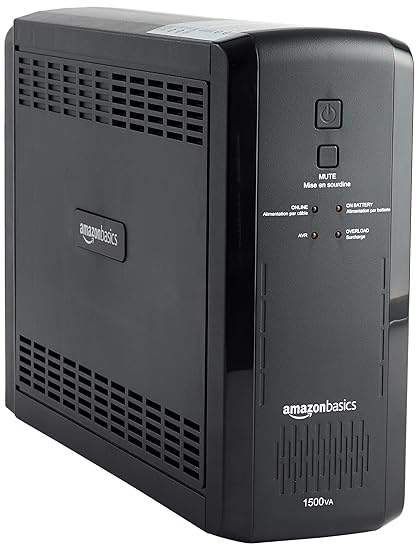
This unit is a straight-up tank for the price. If you have a beefy desktop setup but don’t want to shell out premium cash for brand names, this Amazon Basics unit delivers serious juice (900W). It covers your essential peripherals with 10 outlets—5 for battery backup and 5 for surge protection only, keeping your monitors and tower running long enough to hit “Save.”
Key Features:
- Capacity: Huge 1500VA / 900W capacity handles dual monitors and desktops easily.
- Outlets: 10 total NEMA 5-15R outlets ensure you have room for printers and lamps too.
- Software: Includes management software to auto-shutdown your PC safely during long outages.
Pros & Cons
- Pros:
- Excellent price-to-wattage ratio.
- High 900W ceiling handles most office PCs.
- Simple, no-nonsense design.
- Cons:
- It’s heavy and bulky.
- Not Pure Sine Wave (might buzz with sensitive audio gear).
CyberPower CP1500PFCLCD Sinewave
Best for High-End Workstations & Macs
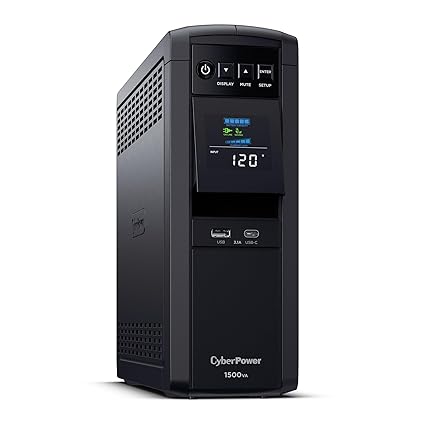
This is the G.O.A.T. for modern electronics. If you run a custom gaming rig or a newer Mac with an Active PFC power supply, you need a Pure Sine Wave UPS like this one. It provides clean electricity that won’t stress your expensive components. It’s got a slick LCD panel to tell you exactly how much runtime you have left before things go dark.
Key Features
- Pure Sine Wave: Essential for efficiency and protecting sensitive Active PFC power supplies.
- Power: 1500VA / 1000W output is enough for powerhouse creative stations.
- Display: The color LCD creates a dashboard for voltage, load, and battery status.
Pros & Cons
- Pros:
- Cleanest power output for sensitive electronics.
- High 1000W load capacity.
- USB charging ports included on the front.
- Cons:
- Pricey compared to simulated sine wave models.
Goldenmate 1000VA LiFePO4 (600W)
Best for Long Lifespan Seekers
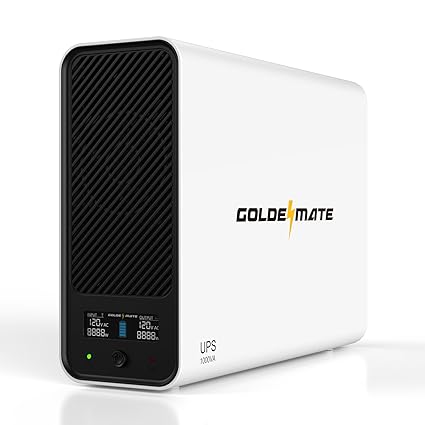
Tired of replacing lead-acid batteries every 3 years? This Goldenmate rocks a Lithium Iron Phosphate (LiFePO4) battery, which boasts a lifespan of up to 10 years. It’s lighter, charges faster, and handles heat better than the old-school bricks. Perfect for a set-it-and-forget-it office upgrade.
Key Features:
- Tech: LiFePO4 battery offers 2000+ cycles compared to ~300 for standard lead-acid.
- Design: Much lighter and more compact than traditional 1000VA units.
- Charging: Recharges to 90% in just 2 hours, getting you ready for the next storm fast.
Pros & Cons
- Pros:
- Massive 10-year projected battery life.
- Lightweight and compact.
- LCD display for easy monitoring.
- Cons:
- Higher upfront cost (but cheaper long term).
APC BE600M1 Back-UPS
Best for Basic Desk & Router Setups
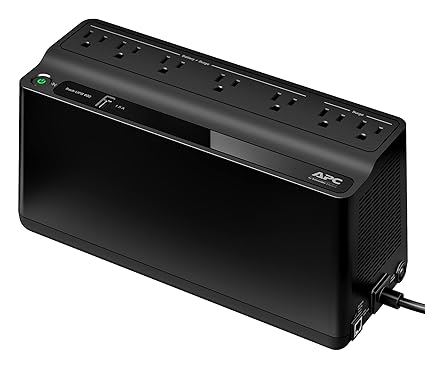
If you just have a laptop, a monitor, and a router, you don’t need a massive tower. This APC unit is compact, reliable, and fits easily under a desk or behind a cabinet. It’s the standard for keeping your internet connection alive so you can finish that Zoom call when the neighborhood power goes out.
Key Features:
- Size: Small footprint, perfect for tight cubicles or home office corners.
- Connectivity: Features a 1.5A USB port to keep your phone juiced up.
- Utility: 600VA is plenty for a router, modem, and a low-power PC.
Pros & Cons
- Pros:
- Affordable and reliable brand pedigree.
- User-replaceable battery.
- Compact “power strip” style form factor.
- Cons:
- Not powerful enough for gaming desktops.
- Wide plugs might block adjacent outlets.
Goldenmate 1000VA LiFePO4 (800W)
Best for Heavy Duty Lithium Power
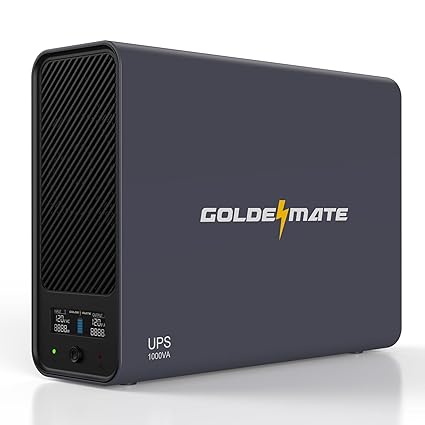
This is the big brother to the 600W Goldenmate. It gives you that same 10-year Lithium longevity but bumps the output wattage to 800W. This is the sweet spot if you want the durability of LiFePO4 but have a hungrier PC or multiple monitors that the 600W version can’t support.
Key Features:
- Power: 800W support covers most mid-range gaming PCs and workstations.
- Durability: Built with high-temp resistance and rapid cooling.
- Silence: Fan control is optimized for quieter office environments.
Pros & Cons
- Pros:
- High wattage with Lithium benefits.
- 8 outlets for comprehensive connectivity.
- Fast charging speed.
- Cons:
- Overkill for just a laptop.
150W Mini UPS Station
Best for NAS & Network Gear

Do not buy this for your computer. Buy this for your NAS (Network Attached Storage) or your modem. This tiny 150W unit is specialized to keep data storage and network equipment running silently. It uses LiFePO4 tech for safety and longevity, ensuring your cloud storage doesn’t crash during a brownout.
Key Features:
- Specialized: Designed specifically for low-power devices like Synology NAS or routers.
- Silent: Zero noise operation, perfect for a quiet home media setup.
- Material: Durable metal casing aids in heat dissipation.
Pros & Cons
- Pros:
- Extremely compact and silent.
- LiFePO4 safety and lifespan.
- Perfect for dedicated network closets.
- Cons:
- 150W limit is very low (will not run a PC/Monitor combo).
Quick Buying Tip
Check your Wattage, not just VA. A “1500VA” unit might only support 900W. If your PC pulls 1000W under load (check your PSU rating), a 900W UPS will trip and shut off immediately when you start gaming or rendering. Always buy a UPS with a Wattage rating higher than your device’s max draw.